
Imagine if your HR team could answer employee questions instantly, 24/7, while simultaneously managing complex onboarding processes, providing personalized benefits guidance, and identifying potential workplace issues before they escalate. This isn’t a futuristic fantasy—it’s happening right now in companies across the globe through HR chatbots and AI agents.
For scaling businesses in industries like SaaS, EdTech, and E-commerce, managing HR processes effectively becomes increasingly critical—and challenging. HR teams find themselves stretched thin, juggling employee onboarding, benefits management, training, performance tracking, and more. When these processes remain manual and fragmented during rapid growth, they create bottlenecks that can literally slow down your business expansion.
The numbers tell the story: Companies with effective HR automation see 41% lower HR costs per employee and 40% faster time-to-productivity for new hires. But here’s the catch—not all automation is created equal. The choice between traditional chatbots and intelligent AI agents can mean the difference between simply digitizing your current inefficiencies and actually transforming your employee experience.
But here’s what most companies get wrong: they think all “chatbots” are the same. The reality is that there’s a fundamental difference between traditional chatbots that simply retrieve information and intelligent AI agents that can reason, learn, and solve complex problems. This distinction isn’t just technical jargon—it determines whether you’ll automate basic FAQ responses or transform your entire employee experience.
Whether you’re managing remote teams, scaling rapidly, or looking to modernize HR operations while maintaining the personal touch that keeps employees engaged, this guide will help you understand how these technologies can be genuine game-changers for your business. .
- The $2.4 Million Question: Chatbot or AI Agent?
- Understanding Chatbots vs. AI Agents: The Technology That Changes Everything
- Advanced Use Cases by Technology Type and Organizational Maturity
- Top HR Chatbots and AI Agents: Complete Vendor Analysis
- Detailed Reviews: Every Platform Analyzed
- Implementation Strategy: Choosing the Right Technology for Your Needs
- Strategic Implementation Framework
- Advanced Use Cases by Organizational Maturity
- ROI Calculation Framework: Traditional Chatbots vs. AI Agents
- ROI Calculation Worksheet
- Implementation Risk Management
- Common Implementation Challenges and Solutions
- Future-Proofing Your HR Chatbot Investment
- Your Next Steps: From Decision to Implementation
The $2.4 Million Question: Chatbot or AI Agent?
Consider this scenario: Sarah, a software engineer at a rapidly growing SaaS company, sends a message at 11 PM: “I’m thinking about taking parental leave next year, but I also just got promoted and we might be moving to Austin. How does this affect my benefits, stock options, and what do I need to tell my manager?”
A traditional chatbot responds: “I found several resources that might help: [Link to parental leave policy] [Link to relocation guide] [Link to stock option FAQ]”
An AI agent responds: “Congratulations on your promotion and upcoming family addition! This is definitely a complex situation with several moving parts. Let me help you navigate this step by step.
First, your promotion actually works in your favor—your new salary will increase your short-term disability benefits by approximately 15% during parental leave. For stock options, your vesting schedule remains unchanged during FMLA leave, and the move to Austin won’t affect them since we’re already registered there.
I’ve reviewed your current benefits and Texas state laws. Here’s your personalized timeline: [detailed plan]. I’m also scheduling a confidential call with our benefits specialist for next Tuesday at 2 PM to review your options in detail.
Would you like me to also research Austin’s childcare options and cost of living adjustments for your new role?”
The difference? The traditional chatbot saved Sarah 5 minutes of searching. The AI agent potentially saved her weeks of stress, prevented compliance issues, and ensured she maximized her benefits during a major life transition. For the company, that AI agent just prevented the potential $200,000+ cost of losing a newly promoted engineer due to poor leave experience.
This is why understanding the difference between chatbots and AI agents isn’t just about technology—it’s about the fundamental approach to employee support that can make or break your scaling efforts.
Understanding Chatbots vs. AI Agents: The Technology That Changes Everything
Before diving into specific solutions, it’s crucial to understand the difference between traditional chatbots and modern AI agents—and why this distinction will determine your ROI, employee satisfaction, and implementation success.
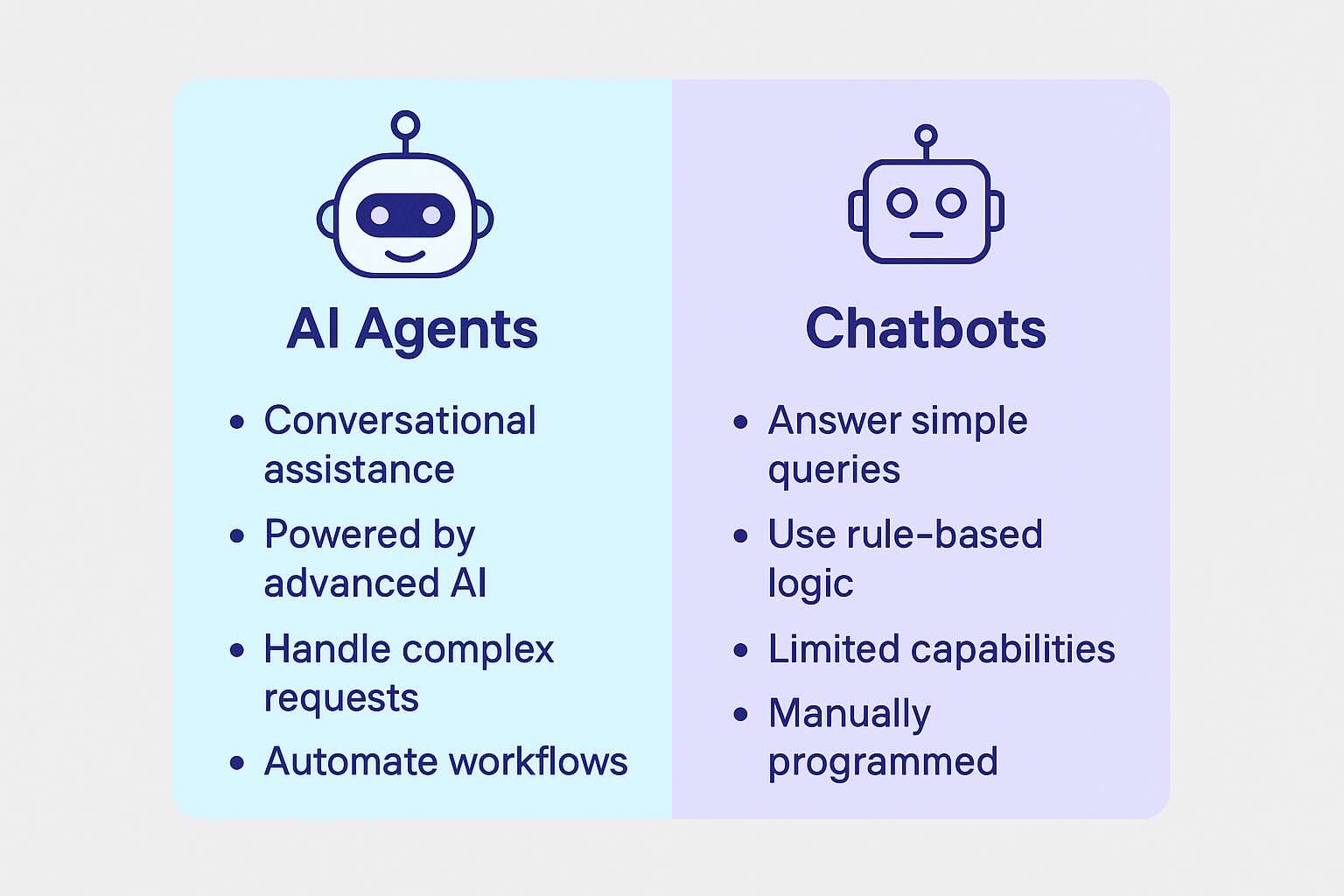
Traditional Chatbots: Digital Responders
A traditional chatbot is essentially a rule-based responder. You tell it exactly what to say and when to say it, and it follows that script every time. Most work by pulling answers from uploaded documents or pre-written responses, triggered by certain keywords or phrases.
Example in Action:
Employee: “I need to request time off”
Traditional Chatbot: “I see you mentioned ‘time off.’ Here are your options: [1] View PTO balance [2] Submit vacation request [3] Check holiday schedule”
Characteristics:
- Follow predetermined conversation flows
- Require exact keyword matches to function properly
- Can handle simple, repetitive tasks effectively
- Need manual updates when policies or procedures change
- Best for straightforward information retrieval
When Traditional Chatbots Work Well:
- Answering basic policy questions (“What’s the dress code?”)
- Distributing standard documents
- Collecting simple information through forms
- Providing links to resources
Chatbots are fast, consistent, and excellent at answering predictable questions, but they can’t handle much beyond the information you’ve given them. If the question is more complicated than the rules you’ve set, the chatbot won’t know what to do without manual updates.
AI Agents: Your Digital HR Specialists
An AI agent goes beyond retrieving information. It’s built to understand context, reason through requests, and take actions across multiple systems — almost like a digital coworker who can think for themselves. AI agents are more sophisticated systems that can understand context, learn from interactions, and perform complex tasks autonomously. Think of them as digital employees who can reason through problems and take actions on behalf of users.
Example in Action:
Employee: “I’m feeling overwhelmed with my workload and think I need some time off, but I’m not sure if I have enough PTO saved up or if taking time off now would affect the Johnson project deadline.”
AI Agent: “I understand you’re feeling overwhelmed. Let me help you assess your situation. I can see you have 8.5 PTO days available. The Johnson project is due March 15th, and you’re currently on track to meet that deadline. Based on your current workload and project status, taking 2-3 days off next week would actually help you return refreshed without impacting the project. Would you like me to check team availability to cover your responsibilities and draft a time-off request?”
Characteristics:
- Understand natural language and context
- Can perform multi-step tasks without explicit instructions
- Learn from previous interactions and improve over time
- Integrate with multiple systems to complete complex workflows
- Adapt to new situations without manual reprogramming
When AI Agents Excel:
- Complex problem-solving that requires understanding context
- Multi-step processes that span different systems
- Personalized recommendations based on individual circumstances
- Tasks that require reasoning and decision-making
The Real-World Impact: Why This Choice Matters
Scenario: New Employee Onboarding
Traditional Chatbot Approach:
- Employee asks: “What do I need to do for onboarding?”
- Chatbot provides: A list of 12 tasks with links to various forms
- Employee must navigate each task independently
- HR still needs to manually track completion and follow up
AI Agent Approach:
- Employee says: “I’m starting Monday and want to make sure I’m prepared”
- Agent responds: “Congratulations on joining the team! I’ve reviewed your role as a Software Engineer in the Austin office. Here’s your personalized onboarding plan: [specific steps]. I’ve already sent your equipment request to IT, scheduled your security badge pickup, and added you to the new hire Slack channel. I’ll check in with you Friday to make sure everything is on track.”
- Agent proactively manages the entire process, coordinating between systems and departments
This fundamental difference affects which solution you choose and how you implement it. Throughout this guide, we’ll help you identify whether each vendor offers traditional chatbot functionality or true AI agent capabilities.
Whether you’re managing remote teams, scaling rapidly, or simply looking to modernize your HR operations, this guide will help you understand how these intelligent tools can be a game-changer for your business.
Advanced Use Cases by Technology Type and Organizational Maturity
Your choice between traditional chatbots and AI agents should align with both your company’s size and the complexity of your HR needs. Here’s how different types of organizations can leverage each technology effectively.
Startups (10-50 employees)
At the startup stage, HR processes are usually straightforward but time-consuming. The focus should be on automating repetitive tasks and establishing consistent responses.
Traditional Chatbot Applications for Startups:
Basic Policy Q&A System: Problem: Same questions asked repeatedly about simple policies Solution: Document-based chatbot that provides instant answers Example Implementation:
- Upload employee handbook and basic policies
- Set up responses for top 20 questions (dress code, vacation policy, benefits basics)
- Deploy on company Slack or intranet Expected Outcome: 70% reduction in basic policy questions to HR team
New Hire Information Hub: Problem: New hires repeatedly ask for the same onboarding information Solution: Information retrieval chatbot for onboarding resources Example:
- Employee asks: “Where do I find the WiFi password?”
- Chatbot responds: “The office WiFi is ‘CompanyName_Guest’ with password ‘Welcome2024!’ You can also find this in your welcome email from IT.”
AI Agent Applications for Startups (When Justified):
Intelligent Onboarding Coordinator: When to consider: If you hire in cohorts or have role-specific onboarding requirements Example scenario:
- Startup hires 5 engineers and 3 sales reps in the same week
- AI agent creates personalized onboarding schedules based on role requirements
- Engineers get technical setup tasks and code repository access
- Sales reps get CRM training and territory assignments
- Agent coordinates with IT, manages, and facilities automatically
Recommended Approach for Startups:
- Start with traditional chatbot for FAQ automation (Chatbase – $19/month)
- Focus on your top 15-20 most common questions
- Upgrade to AI agent only if you’re hiring rapidly or have complex role-based needs
- Budget 2-4 hours weekly for content updates and maintenance
Growing Companies (50-200 employees)
At this stage, HR processes become more complex, with multiple departments, varied employee needs, and the beginning of formal HR systems. The choice between chatbot and AI agent becomes more strategic.
Traditional Chatbot Applications for Growing Companies:
Benefits Enrollment Support System:
Problem: Open enrollment generates hundreds of similar questions
Traditional chatbot solution:
- Upload all insurance plan documents, FSA guides, and 401k information
- Create decision trees for plan selection
- Provide cost calculators and comparison charts Example interaction:
- Employee: “What’s the difference between HSA and FSA?”
- Chatbot: “Based on our 2024 benefits guide: HSA allows you to save pre-tax money for medical expenses with no ‘use it or lose it’ rule. Contribution limit is $4,300 for individuals. FSA also saves pre-tax money but you must use funds by year-end. Contribution limit is $3,200. Which would you like more details about?”
Department-Specific Policy Guidance:
Problem: Different departments have different policies and procedures
Solution: Chatbot with role-based response logic Implementation:
- Sales team gets commission policy information
- Engineering team gets equipment and remote work policies
- Management gets performance review guidelines
AI Agent Applications for Growing Companies:
Comprehensive Performance Review Orchestrator:
When justified: When you have multiple management levels and complex review processes
AI agent capabilities:
- Analyzes past review data to identify improvement areas
- Customizes review questions based on role and career level
- Coordinates review schedules across departments
- Identifies employees who might need additional support or development opportunities Example:
- AI agent notices that Sarah (software engineer) has consistently strong technical reviews but lower scores on collaboration
- Automatically suggests team-building opportunities and communication training
- Schedules follow-up check-ins with her manager
- Tracks progress on development goals
Intelligent Leave Management:
Complex scenario handling:
Employee: “I need to take FMLA leave, but I’m also in the middle of a big project and I’m not sure how it affects my stock options that vest next month.”
AI agent response:
“I understand this is a complex situation with multiple moving parts. Let me help you navigate this:
- FMLA Leave: You’re eligible for up to 12 weeks. I see you haven’t used any FMLA time this year, so you have your full entitlement.
- Project Transition: I can help create a transition plan. Your project deadline is in 6 weeks – would you like me to coordinate with your manager about coverage options?
- Stock Vesting: Your options vest on the 15th of next month. FMLA leave doesn’t affect vesting schedules, so your options will vest as planned.
I’m scheduling a meeting with you, your manager, and our benefits specialist for tomorrow at 2 PM to create a comprehensive plan. I’ll also prepare a transition document for your project responsibilities.”
Recommended Approach for Growing Companies:
- Traditional chatbot for standard processes (benefits, policies, basic onboarding)
- AI agent for complex scenarios (performance management, leave coordination, career development)
- Consider hybrid approach: Chatbase ($19/month) for FAQs + Lindy ($99/month) for intelligent processes
- Dedicate part-time resource (10-15 hours/week) to system management
Established Organizations (200+ employees)
Large organizations face the full spectrum of HR complexity: multiple locations, diverse policies, compliance requirements, and sophisticated employee needs. The technology choice often involves multiple systems working together.
Advanced Traditional Chatbot Applications:
Multi-Language Policy Management System:
Problem: Global workforce needs policy information in multiple languages
Advanced chatbot solution:
- Maintain policy databases in 5+ languages
- Route employees to appropriate language-specific information
- Ensure consistent policy interpretation across regions Example:
- Employee in Madrid asks about maternity leave in Spanish
- Chatbot provides Spanish-language response citing both company policy and Spanish legal requirements
- Automatically escalates complex cases to local HR representative
Compliance Training Coordination:
Problem: Tracking mandatory training across thousands of employees
Chatbot capabilities:
- Send personalized reminders based on role and location
- Provide training materials and track completion
- Escalate non-compliance to management Implementation scale: Handle 10,000+ employee interactions monthly
Advanced AI Agent Applications:
Predictive Employee Support System:
Enterprise AI capabilities:
- Analyzes interaction patterns to predict employee needs
- Identifies at-risk employees based on engagement patterns
- Proactively suggests interventions for retention
- Example scenario: AI agent notices that employees who ask certain types of questions about work-life balance within their first 90 days are 40% more likely to leave within a year. It begins proactively reaching out to new hires with wellness resources and connects them with mentors.
Complex Benefits Optimization:
Enterprise scenario: Employee: “I’m turning 55 next year, thinking about early retirement, have kids starting college, and my spouse might lose her job. How do I optimize my benefits?”
AI agent analysis:
- Reviews employee’s complete benefits history
- Calculates multiple retirement scenarios
- Analyzes healthcare options for family coverage
- Considers tax implications of different choices
- Coordinates with financial planning resources
- Schedules comprehensive benefits counseling sessions
Multi-System Integration Example: When an employee reports a workplace issue:
- AI agent collects initial information sensitively
- Automatically creates incident record in HR system
- Notifies appropriate level of management based on severity
- Schedules follow-up conversations
- Tracks resolution and employee satisfaction
- Updates policy recommendations based on trends
Enterprise Implementation Approach:
- Multiple specialized systems: Traditional chatbots for routine queries, AI agents for complex scenarios
- Dedicated chatbot/AI management team (2-3 FTEs)
- Integration with enterprise systems (Workday, SAP, Oracle)
- Advanced analytics and reporting dashboards
- Budget: $50,000-$200,000 annually depending on complexity
Technology Evolution Path
Most successful implementations follow a maturity curve:
- Stage 1: Traditional chatbot for FAQ automation
- Stage 2: Hybrid approach – chatbot for routine, AI agent for complex scenarios
- Stage 3: Integrated AI agents handling most interactions with human escalation
- Stage 4: Predictive AI that anticipates needs and prevents issues
Evolution Example:
- Month 1-3: Deploy Chatbase for basic policy questions
- Month 4-6: Add Lindy for complex onboarding scenarios
- Month 7-12: Integrate systems and add predictive capabilities
- Year 2+: Advanced analytics and proactive employee support
Top HR Chatbots and AI Agents: Complete Vendor Analysis
We’ve curated a comprehensive list of the top chatbot vendors to help you find a solution that fits your organization’s needs. These vendors cater to diverse HR use cases, offering features like onboarding workflows, performance tracking, and benefits management.
Quick Comparison: Find Your Perfect Match
| Vendor | Type | Best For | Starting Price | Setup Complexity | HRIS Integration |
|---|---|---|---|---|---|
| Jotform | No-Code Hybrid (Form-Centric) | HR teams wanting easy, form-integrated chatbot automation without coding | Free tier available | Very Low | Limited |
| Lindy | AI Agent | Non-technical teams needing intelligent automation | Free tier available | Very Low | Limited |
| Chatbase | Traditional Chatbot | Simple HR documentation and FAQs | $19/mo | Very Low | None |
| CustomGPT.ai | Hybrid AI Agent | Flexible, configurable intelligent solutions | $449/mo | Medium | Yes |
| Landbot | Traditional Chatbot | Easy-to-use workflow automation | $39/mo | Low | Limited |
| Leena AI | Advanced AI Agent | Comprehensive HR automation with intelligence | Custom pricing | High | Extensive |
| LiveChat | Hybrid (Chatbot + Human) | Automation with live agent fallback | $19/mo | Medium | Limited |
Note: While we strive to provide the most up-to-date information, we make no representations or warranties of the completeness or accuracy of this information. Always contact the vendor directly for their offerings and pricing.
Detailed Reviews: Every Platform Analyzed
Jotform – No-Code AI Chatbot Builder for HR Workflows
Technology Type: No-Code Hybrid (Form-Centric)
Jotform’s AI Chatbot Builder is designed specifically for non-technical users who need to deploy HR chatbots quickly without sacrificing customization. It blends elements of both traditional chatbot workflows and AI agent capabilities, with a heavy emphasis on structured data collection and workflow automation. This makes it particularly effective for HR processes that depend on precise information gathering, such as onboarding, benefits enrollment, compliance tracking, and employee surveys.
What Makes It Unique:
Unlike many chatbot platforms built primarily for customer service or open-ended conversation handling, Jotform’s approach is form-first. It transforms forms into interactive, conversational experiences, reducing form abandonment and improving data accuracy — a major advantage for HR teams that rely on complete, correct submissions.
Key Features:
- No coding required: Visual Agent Designer for drag-and-drop creation.
- Ready-made HR templates: 6,000+ templates for onboarding, recruitment, surveys, and training.
- Advanced customization: Adjust conversation flow, branding, and tone to match your organization.
- Form integration: Collect and organize HR data seamlessly during conversations.
- Multi-platform deployment: Embed on websites, intranets, Slack, Teams, and more.
- Workflow automation: Trigger onboarding steps, approval processes, and notifications automatically.
- Training flexibility: Feed the chatbot your HR documents, FAQs, and URLs to customize knowledge.
- Security and compliance: GDPR and HIPAA-ready (with appropriate plan), plus SOC 2 compliance and encryption in transit and at rest.
Specific HR Use Cases with Examples:
Conversational Onboarding Assistant:
- Scenario: New hire completes onboarding in one interactive chatbot session.
- Execution: The chatbot collects personal details, provides links to policies, triggers IT equipment requests, and schedules orientation sessions — all while storing responses in Jotform’s secure database.
Benefits Enrollment Helper:
- Scenario: Employee asks about changing health plans after a qualifying life event.
- Execution: The chatbot walks them through eligibility checks, collects necessary documents, and triggers a review workflow for HR approval.
Compliance Tracker:
- Scenario: Mandatory harassment prevention training for all staff.
- Execution: The chatbot confirms course completion, records dates, and sends reminders to those who haven’t finished.
Implementation Timeline: Same day for basic setup using templates; 2–5 days for customized workflows.
Pros:
- Extremely easy to set up for non-technical HR staff
- Huge template library accelerates deployment
- Excellent for form-heavy HR processes
- Secure and compliance-ready for sensitive data
- Flexible embedding and integration options
Cons:
- Less suited to highly complex, unstructured problem-solving compared to advanced AI agents
- Some advanced features gated to higher-tier plans
- Live onboarding support limited to higher subscription tiers
Best For: HR teams that need to quickly deploy secure, workflow-integrated chatbots for structured processes without coding. Especially useful for onboarding, surveys, and compliance-related tasks.
Pricing: Free tier available; paid plans start at $34/month for Bronze, with HIPAA compliance in Gold or Enterprise plans.
Lindy – AI Agent for Intelligent HR Automation
Technology Type: AI Agent
Lindy represents the next generation of workplace automation, functioning as an AI agent rather than a traditional chatbot. While a chatbot responds to specific commands, Lindy’s AI agent can understand complex requests, reason through problems, and take autonomous actions to complete tasks.
What Makes It an AI Agent: Unlike traditional chatbots that follow pre-scripted paths, Lindy’s AI agent can understand nuanced requests and adapt its responses based on context. For example, if an employee says “I’m having trouble with my benefits,” a traditional chatbot might provide a generic benefits FAQ link. Lindy’s agent would ask clarifying questions, analyze the employee’s specific situation, and provide targeted guidance.
Key Features:
- Autonomous Task Execution: The AI agent can complete multi-step processes without human intervention
- Contextual Understanding: Interprets the meaning behind requests, not just keywords
- Pre-built HR Templates: Ready-made workflows for common HR scenarios
- Visual Workflow Builder: Drag-and-drop interface for customizing agent behavior
- Intelligent Slack Integration: Provides sophisticated HR support directly in team channels
- Learning Capabilities: Improves responses based on successful interactions
Specific HR Use Cases with Examples:
Intelligent New Hire Onboarding:
- Traditional approach: Send new hire a checklist of 15 tasks to complete
- Lindy’s AI agent approach: “Hi Sarah! I see you’re starting as a Product Manager on Monday. I’ve customized your onboarding based on your role and remote location. I’ve already ordered your laptop (arriving Friday), scheduled your IT setup call, and added you to the product team channels. Your manager Jennifer has blocked time Tuesday at 2 PM for your first 1:1. Is there anything specific about the role or company you’d like to know before you start?”
Adaptive Benefits Guidance:
- Employee query: “My spouse just got a new job with better insurance. Should I change my health plan?”
- AI agent response: “That’s an important decision. Let me help you compare options. I can see you’re currently on our Premium plan covering you and your spouse for $280/month. To give you the best advice, I need to understand your new options. Can you tell me about your spouse’s new coverage? I’ll then run a comparison including deductibles, networks, and total costs to help you decide. I can also check if this qualifies as a life event for mid-year changes.”
Implementation Timeline: 1-3 days for basic agent setup, 1-2 weeks for advanced autonomous workflows
Pros:
- True intelligence rather than scripted responses
- Learns and improves from interactions
- Handles complex, multi-part requests naturally
- Excellent for non-technical teams
- Free tier allows testing before commitment
Cons:
- AI agent capabilities may be beyond what some organizations need
- Limited deep HRIS integration compared to enterprise solutions
- Newer technology with evolving feature set
Best For: Small to medium-sized teams that want intelligent automation that can handle nuanced HR requests and grow more capable over time, especially organizations using Slack heavily.
Pricing: Free tier available; paid plans start around $99/month for advanced AI agent capabilities
Chatbase – Traditional Chatbot for Document-Based Support
Technology Type: Traditional Chatbot
Chatbase operates as a traditional chatbot, excelling at retrieving information from documents and providing consistent answers to frequently asked questions. Think of it as a very sophisticated search engine that can understand natural language questions about your HR materials.
What Makes It a Traditional Chatbot: Chatbase is primarily designed for information retrieval. It learns from your documents and can answer questions about their content, but it doesn’t perform actions or make decisions. It’s excellent at what chatbots do best: providing quick, accurate answers to common questions.
Key Features:
- Document Intelligence: Upload any HR document and the chatbot instantly learns its contents
- Multi-format Support: Processes PDFs, Word documents, text files, and web pages
- Automatic Training: Simply upload content and the chatbot begins answering questions immediately
- Website Integration: Easy embedding on company intranets or HR portals
- Simple Customization: Basic branding and appearance modifications
Understanding the Document Training Process:
Step 1 – Content Upload: You might upload your employee handbook, benefits guide, PTO policy, and dress code document.
Step 2 – Automatic Processing: Chatbase reads and indexes all the content, creating connections between related information.
Step 3 – Immediate Functionality: Employees can ask questions like:
- “How many vacation days do I get?” → Chatbase finds and cites the PTO policy
- “Can I wear jeans on Friday?” → References the dress code section
- “Who do I contact about 401k questions?” → Provides the specific contact from benefits guide
Specific HR Use Cases with Examples:
Employee Handbook Digitization:
- Problem: Employees constantly ask HR about policies buried in a 50-page handbook
- Chatbase solution: Upload handbook once, and employees get instant answers
- Example interaction:
- Employee: “What’s the policy on working from home?”
- Chatbase: “According to the Employee Handbook, section 4.2: Remote work is permitted up to 2 days per week with manager approval. Requests should be submitted at least 48 hours in advance through the HR portal.”
Benefits Open Enrollment Support:
- Traditional approach: HR fields hundreds of questions about insurance options during open enrollment
- Chatbase approach: Upload all insurance guides and FAQs, letting employees self-serve
- Example:
- Employee: “What’s the difference between the gold and silver health plans?”
- Chatbase: “Based on the 2024 Benefits Guide: Gold Plan has a $500 deductible and $25 copays, while Silver Plan has a $1,500 deductible and $40 copays. Gold costs $180/month for individual coverage vs $120 for Silver.”
Implementation Timeline: Same day for basic setup, 2-3 days for comprehensive document training
Setup Process Breakdown:
- Hour 1: Create account and upload your first HR document
- Hour 2: Test with common questions, upload additional documents as needed
- Day 2: Customize appearance and integrate into your website/intranet
- Day 3: Train employees on how to use it and collect feedback
Pros:
- Incredibly fast setup – functional within hours
- Excellent at handling document-based questions
- Very cost-effective for small businesses
- No technical expertise required
- Reliable, consistent answers every time
Cons:
- Cannot perform actions or complete tasks
- Limited to information that exists in uploaded documents
- No workflow automation capabilities
- Basic analytics compared to AI agent solutions
Best For: Companies that want to instantly make their HR documentation searchable and accessible, particularly those with comprehensive written policies and procedures.
Pricing: Starting at $19/month for basic document-based chatbot functionality
CustomGPT.ai – Hybrid AI Agent for Enterprise Flexibility
Technology Type: Hybrid AI Agent
CustomGPT.ai bridges traditional chatbots and advanced AI agents, offering both scripted workflows and intelligent reasoning capabilities. This hybrid approach makes it powerful for organizations that need reliable, predictable responses for some tasks while maintaining the flexibility to handle complex, unique situations.
Understanding the Hybrid Approach:
Scripted Mode for Reliability: For critical processes like compliance training or benefits enrollment, CustomGPT.ai can follow predetermined paths to ensure consistent, accurate responses every time.
AI Agent Mode for Complexity: When employees have unique situations or complex questions, the system can switch to intelligent reasoning mode to provide personalized guidance.
Real-World Example:
Employee: “I’m going on maternity leave in 3 months, but I also just got promoted. How does this affect my benefits and when should I notify everyone?”
Hybrid Response:
“Congratulations on both your promotion and upcoming addition to your family! This situation involves several considerations. Let me break this down:
Promotion Impact: Your new salary will increase your disability benefits by approximately 15%. I’ll need to update your benefit calculations.
Timeline Recommendations: Based on company policy and your team’s current projects, I recommend notifying your direct manager by [specific date] and HR by [specific date].
Transition Planning: I can help you create a coverage plan for your new responsibilities. Would you like me to draft a transition document and schedule planning meetings with your team?
I’m also scheduling a comprehensive benefits review meeting for next week to ensure you optimize your leave benefits with your new compensation level.”
Key Features:
- Intelligent Workflow Engine: Combines predetermined paths with adaptive reasoning
- Advanced Knowledge Integration: Maintains extensive, searchable knowledge bases with version control
- Multi-System Orchestration: Connects with HRIS, email, calendar, and productivity tools
- Role-Based Intelligence: Adapts responses based on employee level, department, and location
- Predictive Capabilities: Anticipates next steps and proactively suggests actions
Complex HR Use Cases with Examples:
Performance Review Orchestration: Instead of just reminding employees about reviews, CustomGPT.ai can:
- Analyze past review data to suggest focus areas
- Coordinate schedules between managers and direct reports
- Generate pre-populated review forms based on role-specific metrics
- Follow up on action items from previous reviews
- Identify employees who might benefit from additional support
Multi-Location Policy Management: Scenario: Your company has offices in California, Texas, and New York with different leave policies. AI Agent Capability: Automatically applies the correct state regulations, calculates leave entitlements based on location, and ensures compliance while providing consistent employee experience.
Implementation Timeline: 2-4 weeks for comprehensive deployment with full integration
Enterprise Features in Action:
Conditional Logic Examples:
- If employee is remote + California-based + manager-level → Trigger specific onboarding sequence
- If benefits question + open enrollment period + family status change → Escalate to benefits specialist with full context
- If performance concern + high performer + retention risk → Notify HR leadership and suggest intervention
Advanced Analytics Applications:
- Identify patterns in employee questions that signal policy confusion
- Predict which new hires might struggle based on onboarding interaction patterns
- Track sentiment analysis to flag potential engagement issues
Pros:
- Balances reliability with intelligence
- Highly customizable for unique organizational needs
- Robust integration ecosystem supports complex workflows
- Advanced analytics provide actionable insights
- Can scale from simple Q&A to sophisticated automation
Cons:
- Requires significant setup and customization time
- Higher learning curve for administrators
- More expensive than basic alternatives
- May be over-engineered for simple use cases
Best For: Medium to large organizations (100+ employees) that need both reliable, consistent processes and the intelligence to handle complex, unique situations. Ideal for companies with diverse policies, multiple locations, or complex compliance requirements.
Pricing: Premium plan starts at $449/month; Enterprise plans with advanced AI agent capabilities available with custom pricing
Landbot – Visual Workflow Builder
Landbot’s no-code platform simplifies creating conversational workflows for HR teams. Its intuitive visual design makes it a practical option for small-to-medium-sized businesses seeking quick solutions for automating HR tasks.
Key Features:
- Intuitive drag-and-drop workflow builder
- Interactive form collection within conversations
- Custom branding and white-label options
- Multi-channel deployment (web, WhatsApp, Facebook Messenger)
- Webhook integrations for data collection
Specific HR Use Cases:
- Interactive Onboarding Forms: Collect tax information, emergency contacts, and preferences through conversational interfaces
- Leave Request Processing: Create approval workflows for vacation and sick leave requests
- Survey and Feedback Collection: Design engaging surveys for employee satisfaction and pulse checks
- IT Support Triage: Create decision trees for common technical issues
- Event Registration: Manage sign-ups for company events and training sessions
Implementation Timeline: 3-5 days for basic workflows, 1-2 weeks for complex processes
Step-by-Step Setup:
- Choose from pre-built HR templates or start from scratch
- Use the visual builder to map out conversation flows
- Add form elements for data collection
- Set up integrations with your existing tools
- Test and deploy across chosen channels
Pros:
- Very intuitive visual interface
- Great for creating engaging, interactive experiences
- Strong form-building capabilities
- Reasonable pricing for mid-market companies
Cons:
- Limited AI capabilities compared to more advanced platforms
- Requires manual workflow design
- Less suitable for complex integrations
Best For: HR teams that want to create engaging, interactive experiences without technical complexity, especially for data collection and simple automation.
Pricing: Business plan starts at $450/month (note: pricing may have changed; confirm with vendor)
Leena AI – Enterprise HR Automation
Leena AI is designed to optimize the employee experience through comprehensive automation and deep HRIS integration. Its robust features make it suitable for large organizations with complex HR needs, including compliance, training, and performance management.
Key Features:
- Deep integration with major HRIS platforms (Workday, SAP SuccessFactors, Oracle HCM)
- Advanced task automation and workflow orchestration
- Role-based personalization and department-specific journeys
- Comprehensive analytics dashboard with actionable insights
- AI-powered natural language understanding
Specific HR Use Cases:
- Automated Performance Management: Track goals, schedule reviews, and collect 360-degree feedback
- Compliance Orchestration: Ensure mandatory training completion and policy acknowledgments
- Benefits Administration: Guide employees through open enrollment with personalized recommendations
- Advanced Analytics: Identify bottlenecks in HR processes and employee sentiment trends
- Multi-location Support: Handle different policies and procedures across global offices
Implementation Timeline: 6-12 weeks for full deployment with integration
Enterprise Features:
- Custom Reporting: Generate detailed reports on employee interactions and process efficiency
- API-First Architecture: Integrate with virtually any business system
- Advanced Security: Enterprise-grade security with audit trails and compliance features
- Scalability: Handle thousands of simultaneous conversations
Pros:
- Most comprehensive feature set for enterprise needs
- Excellent HRIS integration capabilities
- Advanced analytics and reporting
- Proven track record with large organizations
Cons:
- Significant implementation time and cost
- Requires technical resources for optimal setup
- May be complex for smaller organizations
- Custom pricing can be expensive
Best For: Large organizations (500+ employees) that need comprehensive HR automation with deep system integration and advanced analytics.
Pricing: Custom pricing based on company size and feature requirements; typically starts at $10,000+ annually
LiveChat – Hybrid Automation with Human Fallback
LiveChat combines chatbot automation with live-agent escalation, making it ideal for companies that want to balance automation with human interaction for complex or sensitive HR matters.
Key Features:
- Seamless bot-to-human handoff capabilities
- Real-time agent dashboard for managing conversations
- Customizable automation rules and triggers
- Integration with popular business tools
- Mobile apps for on-the-go HR support
Specific HR Use Cases:
- Escalated Issue Handling: Route complex payroll or benefits questions to human agents
- Sensitive Conversations: Handle harassment reports or personal issues with human oversight
- New Hire Support: Provide immediate assistance during onboarding with expert backup
- Crisis Management: Ensure human support is available during organizational changes
- Executive Support: Provide premium service for leadership team inquiries
Implementation Timeline: 1-2 weeks for full setup with agent training
Hybrid Model Benefits:
- 24/7 Basic Support: Handle common questions automatically while routing complex issues to agents
- Agent Efficiency: Agents can handle multiple conversations simultaneously with bot assistance
- Conversation Context: Human agents receive full conversation history for seamless transitions
- Quality Assurance: Monitor both bot and human interactions for continuous improvement
Pros:
- Perfect balance of automation and human touch
- Excellent for handling sensitive HR matters
- Real-time support capabilities
- Established platform with strong reliability
Cons:
- Ongoing costs for live agent time
- Requires agent training and management
- Less suitable for pure automation scenarios
Best For: Organizations that want automation for routine tasks but need human expertise available for complex or sensitive HR issues.
Pricing: Business plan starts at $59/agent/month (pricing may vary)
Implementation Strategy: Choosing the Right Technology for Your Needs
Understanding Implementation Complexity by Technology Type
The type of technology you choose—traditional chatbot versus AI agent—significantly impacts your implementation approach, timeline, and required resources. Understanding these differences helps set realistic expectations and plan appropriately.
Traditional Chatbot Implementation
What You’re Building: Traditional chatbots are like digital flowcharts. You’re essentially creating a series of “if this, then that” rules that respond to specific keywords and phrases.
Setup Process Example (Chatbase or Landbot):
- Content Preparation (Day 1): Gather all HR documents, policies, and FAQs
- Information Architecture (Day 2): Organize content into logical categories and question types
- Response Creation (Days 3-4): Write specific answers for anticipated questions
- Testing & Refinement (Day 5): Test with various phrasings of the same question
- Deployment (Day 6): Launch and monitor for gaps
Example Implementation Challenge: Your chatbot might be programmed to respond to “vacation time” but not understand “time off” or “PTO” unless you specifically program all variations. You’ll need to anticipate every possible way employees might phrase their questions.
AI Agent Implementation
What You’re Building: AI agents require training on your organization’s context, policies, and desired behaviors. You’re teaching an intelligent system to understand your company culture and make appropriate decisions.
Setup Process Example (Lindy or CustomGPT.ai):
- Organizational Context Training (Week 1): Input company policies, culture guidelines, and decision frameworks
- Workflow Mapping (Week 2): Define complex processes and decision trees for the agent to learn
- Integration Configuration (Week 3): Connect with existing systems and establish data flows
- Intelligence Calibration (Week 4): Train the agent on your organization’s specific language, priorities, and escalation criteria
- Supervised Learning Period (Weeks 5-6): Monitor interactions and refine the agent’s decision-making capabilities
Example Implementation Advantage: An AI agent can understand that “I need some time to recharge,” “I’m feeling burned out,” and “Can I take a mental health day?” all relate to the same underlying need for time off, and can respond appropriately while also potentially flagging wellness concerns to HR.
Choosing Based on Your Use Case Complexity
When Traditional Chatbots Sufficient:
- Straightforward policy questions with clear answers
- Document distribution and basic information retrieval
- Simple form collection with no conditional logic
- FAQs with predictable variations
When AI Agents Become Necessary:
- Complex employee situations requiring nuanced understanding
- Multi-step processes that span different systems
- Personalized recommendations based on individual circumstances
- Proactive support and predictive assistance
Strategic Implementation Framework
Understanding your technology choice is just the beginning. Successful implementation requires a structured approach that accounts for organizational readiness, change management, and continuous improvement.
Phase 1: Assessment and Planning (Week 1-2)
Technology Readiness Assessment:
Before selecting any solution, evaluate what type of intelligence your organization actually needs:
Traditional Chatbot Indicators:
- Most HR questions have straightforward, policy-based answers
- Your team prefers predictable, consistent responses
- Limited integration requirements with existing systems
- Small HR team with basic automation needs
Example Assessment Question: When employees ask about vacation time, do they typically need just the policy information, or do they often have complex situations like “I’m getting married, moving to a different state, and starting a new role – how does this affect my time off?”
AI Agent Indicators:
- Frequent complex, multi-part employee questions
- Need for personalized guidance based on individual circumstances
- Desire for proactive support and predictive assistance
- Integration requirements across multiple systems
Audit Current Pain Points with Examples:
Information Retrieval Problems:
- Traditional solution needed: “Employees constantly ask the same 20 questions about benefits”
- AI agent solution needed: “Every benefits question leads to a 15-minute conversation about their specific family situation”
Process Efficiency Issues:
- Traditional solution: “We need to automate distributing the same forms to every new hire”
- AI agent solution: “Each new hire has different requirements based on their role, location, and start date”
Define Success Metrics by Technology Type:
Traditional Chatbot Metrics:
- Reduction in repetitive questions to HR team
- Accuracy of information provided (measured by follow-up questions)
- Employee adoption rate for self-service
AI Agent Metrics:
- Complex problem resolution without human intervention
- Employee satisfaction with personalized guidance
- Proactive issue identification and prevention
Phase 2: Vendor Selection and Pilot Design (Week 3-4)
Vendor Evaluation by Technology Type:
For Traditional Chatbot Needs: Focus on ease of setup, content management capabilities, and integration simplicity. Test with your most common, straightforward questions.
For AI Agent Needs: Evaluate intelligence capabilities, learning mechanisms, and ability to handle ambiguous requests. Test with complex, multi-part scenarios.
Pilot Program Design Examples:
Traditional Chatbot Pilot:
- Select 50 most frequently asked HR questions
- Upload relevant policy documents
- Test response accuracy and completeness
- Measure reduction in direct HR inquiries
AI Agent Pilot:
- Identify 10 complex employee scenarios that currently require significant HR time
- Train the agent on your decision-making processes
- Test the agent’s ability to provide contextual, personalized guidance
- Measure quality of guidance and employee satisfaction
Phase 3: Testing and Refinement (Week 5-6)
Internal Testing:
- Have HR team members interact with the chatbot extensively
- Document gaps in knowledge or functionality
- Refine responses and add missing information
- Test edge cases and unusual questions
Limited Employee Rollout:
- Deploy to 10-20 employees in different departments
- Collect feedback on usefulness and accuracy
- Monitor conversation logs for improvement opportunities
- Adjust workflows based on real usage patterns
<h4>Phase 4: Full Deployment (Week 7-8)</h4>
Company-wide Launch:
- Announce the new chatbot through multiple channels
- Provide clear instructions on how to access and use it
- Set expectations for what it can and cannot do
- Establish feedback channels for ongoing improvement
Monitor and Optimize:
- Track usage metrics and success indicators
- Regularly review conversation logs for insights
- Update knowledge base with new information
- Plan expansion to additional use cases
Advanced Use Cases by Organizational Maturity
Startups (10-50 employees)
Priority Use Cases:
- Basic FAQ automation for common policy questions
- New hire document distribution and basic guidance
- Simple feedback collection through pulse surveys
- IT support for password resets and basic troubleshooting
Recommended Approach:
- Start with Chatbase or Lindy for quick, low-cost implementation
- Focus on document-based Q&A to reduce repetitive questions
- Use chatbot to create consistent onboarding experience
- Plan for 2-4 hours of setup time per week
Growing Companies (50-200 employees)
Enhanced Use Cases:
- Structured onboarding workflows with role-specific paths
- Benefits enrollment guidance with decision trees
- Performance review scheduling and reminder automation
- Leave request processing with approval workflows
- Training program recommendations and tracking
Recommended Approach:
- Consider Landbot or CustomGPT.ai for workflow capabilities
- Integrate with existing HRIS or productivity tools
- Implement multi-channel deployment (Slack, email, web)
- Dedicate a part-time resource to chatbot management
Established Organizations (200+ employees)
Comprehensive Use Cases:
- Multi-language support for global teams
- Complex compliance tracking and reporting
- Advanced performance management automation
- Predictive analytics for employee satisfaction and retention
- Integration with multiple enterprise systems
Recommended Approach:
- Evaluate Leena AI or CustomGPT.ai for enterprise features
- Plan for professional implementation services
- Establish governance processes for content management
- Create dedicated chatbot management role or team
ROI Calculation Framework: Traditional Chatbots vs. AI Agents
Understanding the financial impact of your technology choice helps justify the investment and set realistic expectations. The ROI calculation differs significantly between traditional chatbots and AI agents.
Traditional Chatbot ROI Model
Traditional chatbots primarily save time by automating information retrieval and simple task guidance. The value is measurable and predictable.
Time Savings Calculation Example:
Current State Analysis:
- Company: 150 employees
- Average HR queries per month: 300
- Average time per query: 15 minutes
- HR team hourly rate: $35
- Monthly cost of manual handling: 300 queries × 0.25 hours × $35 = $2,625
Chatbot Implementation:
- Setup cost: $500 (one-time)
- Monthly subscription: $50 (Chatbase or similar)
- Queries automated: 70% (210 queries)
- Time saved: 210 queries × 0.25 hours = 52.5 hours monthly
- Monthly savings: 52.5 hours × $35 = $1,837.50
First Year ROI:
- Annual savings: $22,050
- Annual costs: $500 + ($50 × 12) = $1,100
- Net benefit: $20,950
- ROI: 1,905%
Limitations of Traditional Chatbot ROI:
- Only accounts for time savings on routine questions
- Doesn’t include opportunity costs of complex issues not addressed
- May plateau as easy questions are automated
AI Agent ROI Model
AI agents provide ROI through time savings plus value creation through better decision-making, proactive support, and improved employee experience.
Comprehensive Value Calculation Example:
Same Company Setup:
- 150 employees, same query volume and costs
AI Agent Implementation (Lindy or CustomGPT.ai):
- Setup cost: $2,000 (including training and integration)
- Monthly subscription: $300
- Queries automated: 85% (255 queries)
- Enhanced capabilities create additional value:
Direct Time Savings:
- Queries automated: 255 × 0.25 hours = 63.75 hours monthly
- Monthly savings: 63.75 hours × $35 = $2,231.25
Value-Added Benefits:
- Proactive Issue Resolution: AI identifies potential problems early
- Prevents 2 employee departures annually = $40,000 savings (recruitment/training costs)
- Improved Decision Quality: Better guidance leads to fewer mistakes
- Reduces HR compliance issues by 50% = $5,000 annual savings
- Enhanced Employee Satisfaction: Better experience improves retention
- 5% improvement in retention = $15,000 annual value
First Year ROI:
- Direct savings: $26,775 (time savings)
- Value-added benefits: $60,000
- Total annual value: $86,775
- Annual costs: $2,000 + ($300 × 12) = $5,600
- Net benefit: $81,175
- ROI: 1,450%
<h3>Choosing Based on ROI Potential</h3>
When Traditional Chatbot ROI is Sufficient:
- High volume of routine, repetitive questions
- Clear, policy-based answers available
- Limited complexity in employee situations
- Budget constraints require lower upfront investment
When AI Agent ROI Justifies Higher Investment:
- Complex employee situations that benefit from intelligent guidance
- Opportunity for proactive problem prevention
- Employee experience is a strategic priority
- Compliance and risk management are critical
ROI Calculation Worksheet
Step 1: Quantify Current Costs
- Monthly HR query volume: ____
- Average time per query: ____ minutes
- HR team average hourly rate: $____
- Monthly manual processing cost: $____
Step 2: Estimate Automation Potential
- Traditional chatbot automation rate: 60-80%
- AI agent automation rate: 80-90%
- Choose your expected rate: ____%
Step 3: Calculate Technology Costs
- Setup/implementation cost: $____
- Monthly subscription cost: $____
- Maintenance time cost: $____
Step 4: Identify Value-Added Opportunities
- Potential retention improvements: $____
- Compliance risk reduction: $____
- Employee satisfaction benefits: $____
Implementation Risk Management
Understanding potential risks and mitigation strategies helps ensure successful deployment regardless of your technology choice.
Traditional Chatbot Implementation Risks
Risk 1: Information Accuracy Problems Problem: Outdated or incorrect information provided to employees Example: Chatbot continues to reference old PTO policy after company changes benefits Mitigation:
- Establish monthly content review schedules
- Assign specific owners to different information categories
- Implement version control for all uploaded documents
- Create feedback mechanisms for employees to report inaccuracies
Risk 2: Limited Query Understanding Problem: Chatbot fails to understand variations in how employees phrase questions Example: Understands “vacation time” but not “time off,” “PTO,” or “personal days” Mitigation:
- Extensive testing with varied phrasings during setup
- Regular analysis of “I don’t understand” responses
- Continuous expansion of keyword recognition
- Clear guidance to employees on effective phrasing
Risk 3: Employee Frustration with Limitations Problem: Employees get frustrated when chatbot can’t handle their specific situation Mitigation:
- Set clear expectations about chatbot capabilities
- Provide easy escalation paths to human support
- Monitor satisfaction metrics and address pain points
- Continuously expand capabilities based on common escalations
AI Agent Implementation Risks
Risk 1: Over-Complexity in Responses
Problem: AI agent provides overly complex or confusing guidance
Example: Employee asks simple question about dress code, gets 300-word response about workplace culture
Mitigation:
- Train agent on appropriate response length for different query types
- Regular review of response quality and employee feedback
- A/B testing different response styles
- Clear guidelines for when to provide simple vs. detailed answers
Risk 2: Inconsistent Decision-Making
Problem: AI agent gives different advice for similar situations
Example: Provides different leave recommendations to two employees in similar circumstances
Mitigation:
- Extensive training on company policies and decision frameworks
- Regular auditing of agent decisions for consistency
- Escalation protocols for complex or ambiguous situations
- Feedback loops to improve decision-making over time
Risk 3: Privacy and Security Concerns
Problem: Employees hesitant to share sensitive information with AI system
Mitigation:
- Clear privacy policies and data handling explanations
- Secure deployment and data encryption
- Options for anonymous interactions when appropriate
- Regular security audits and compliance verification
Universal Implementation Best Practices
Change Management Strategy:
- Soft Launch: Deploy to HR team first for internal testing
- Department Pilots: Roll out to friendly departments willing to provide feedback
- Gradual Expansion: Add departments based on success metrics
- Full Deployment: Company-wide launch with comprehensive support
Success Monitoring Framework:
- Usage Metrics: Track adoption rates and interaction volume
- Quality Metrics: Monitor response accuracy and employee satisfaction
- Efficiency Metrics: Measure time savings and process improvements
- Feedback Collection: Regular surveys and informal feedback gathering
Continuous Improvement Process:
- Monthly performance reviews and content updates
- Quarterly feature enhancements and capability expansions
- Annual technology assessment and potential upgrades
- Ongoing training and optimization based on usage patterns
Common Implementation Challenges and Solutions
Challenge 1: Employee Adoption
Problem: Employees continue to contact HR directly instead of using the chatbot.
Solutions:
- Make chatbot the primary contact method by featuring it prominently
- Train managers to direct team members to the chatbot first
- Implement a gentle redirect system where HR asks “Did you try the chatbot?”
- Gamify usage with recognition for teams that effectively use self-service
Challenge 2: Information Accuracy
Problem: Outdated or incorrect information in chatbot responses.
Solutions:
- Establish a monthly content review process
- Assign specific team members as content owners for different topics
- Implement version control for policy documents
- Create feedback loops for employees to report inaccuracies
Challenge 3: Complex Query Handling
Problem: Chatbot cannot handle nuanced or complex employee situations.
Solutions:
- Design clear escalation paths to human agents
- Set appropriate expectations about chatbot limitations
- Use hybrid models that seamlessly transfer to human agents
- Create “escalation keywords” that immediately route to humans
Challenge 4: Integration Difficulties
Problem: Chatbot doesn’t work well with existing HRIS or productivity tools.
Solutions:
- Prioritize vendors with pre-built integrations for your tools
- Consider API-based solutions for custom integrations
- Implement gradual integration rather than attempting everything at once
- Work with vendor support teams for integration assistance
Future-Proofing Your HR Chatbot Investment
Emerging Trends to Consider
- Voice Integration: Prepare for voice-activated HR assistance through smart speakers and mobile devices.
- Predictive Analytics: Advanced chatbots will predict employee needs and proactively provide information.
- Emotional Intelligence: Next-generation chatbots will better understand context and emotional cues in conversations.
- Multi-modal Interactions: Future chatbots will handle text, voice, and visual inputs seamlessly.
Scalability Considerations
- Content Management: Establish processes that can handle growing amounts of HR information and policies.
- Global Expansion: Choose solutions that can easily add new languages and regional compliance requirements.
- Integration Ecosystem: Prioritize platforms with robust API capabilities for future tool integrations.
- Analytics Evolution: Select solutions that can grow their reporting capabilities as your data needs become more sophisticated.
Your Next Steps: From Decision to Implementation
HR chatbots represent a transformative opportunity for scaling companies to improve efficiency, enhance employee experience, and free up HR teams for strategic work. The key to success lies in choosing the right solution for your current needs while planning for future growth.
- Start small and iterate: Begin with a simple use case like FAQ automation, prove value, and expand gradually. This approach minimizes risk while building organizational confidence in AI-powered HR tools.
- Focus on employee experience: The best chatbot is one that employees actually want to use. Prioritize ease of use, accuracy, and helpful responses over flashy features.
- Plan for scale: Choose a solution that can grow with your organization, whether that means handling more employees, additional languages, or more complex workflows.
- Measure and optimize: Establish clear metrics for success and regularly review chatbot performance to identify improvement opportunities.
The HR chatbot market is rapidly evolving, with new capabilities and more sophisticated solutions emerging regularly. By starting with a solid foundation and maintaining a focus on employee needs, your organization can leverage these powerful tools to create a more efficient, responsive, and satisfying HR experience for everyone involved.
Ready to get started? Begin by auditing your most time-consuming HR processes and identifying which vendor best matches your technical capabilities and budget. The future of HR is automated, personalized, and always available – and that future is available today.